
Kubernetes Services - NodePort
Website Visitors:Fundamentals of Kubernetes Services
A Kubernetes Service is an abstraction that defines a logical set of Pods and a policy by which to access them—typically via a stable virtual IP (ClusterIP), DNS name, and optional load balancing. It decouples pod lifecycle from client access, allowing pods to be added, removed, or restarted without changing how other components reach the service. Without services, pod IP addresses are ephemeral - that means - when a pod dies and is replaced, its IP changes. Services provide a stable interface to dynamic pod sets.
Communication patterns in Kubernetes fall into distinct categories:
Internal cluster communication: Microservices communicating within the cluster boundary. Frontend pods must reach backend pods; backend pods must connect to database pods. These communication paths require stable endpoints despite underlying pod volatility.
External to internal communication: External users or systems requiring access to applications running inside the cluster. This necessitates bridging external networks with the internal pod network.
Internal to external communication: Applications inside the cluster reaching external services—external APIs, legacy databases, or third-party services.
Services address all three patterns through different service types and configurations.
Service Types: Technical Overview
Kubernetes provides three primary service types, each serving distinct networking requirements:
ClusterIP (Default)
ClusterIP assigns a virtual IP address from the cluster’s internal IP range. This IP exists only within the cluster network—no external routing exists. ClusterIP services enable internal communication between application components.
The virtual IP is not bound to any network interface. Instead, kube-proxy on each node watches the service and endpoint objects, programming iptables or IPVS rules to redirect traffic destined for the ClusterIP to backend pods.
Use cases: Internal APIs, databases, microservices that should not be externally accessible.
NodePort
NodePort builds upon ClusterIP by additionally exposing a port on every cluster node. Traffic arriving at <NodeIP>:<NodePort> routes to the service’s ClusterIP, which then forwards to backend pods.
NodePort range: 30000-32767 by default, configurable via the --service-node-port-range API server flag.
When you define a Service of type NodePort, Kubernetes automatically provisions a ClusterIP for that Service. The NodePort extension exposes the service externally, but the internal ClusterIP remains the primary interface for internal cluster traffic.
NodePort services create iptables rules on each node, capturing traffic on the designated port and NAT-ing it to the service’s cluster IP.
Use cases: Development environments, internal tools, applications requiring external access without a cloud load balancer.
LoadBalancer
LoadBalancer integrates with cloud provider infrastructure (AWS ELB, Google Cloud Load Balancer, Azure Load Balancer). It provisions an external load balancer that directs traffic to a NodePort service, which then forwards to ClusterIP and ultimately to pods.
LoadBalancer services automatically create NodePort and ClusterIP components as prerequisites.
Use cases: Production applications requiring external access with cloud-grade load balancing, SSL termination, and static IPs.
NodePort Deep Dive: Port Architecture
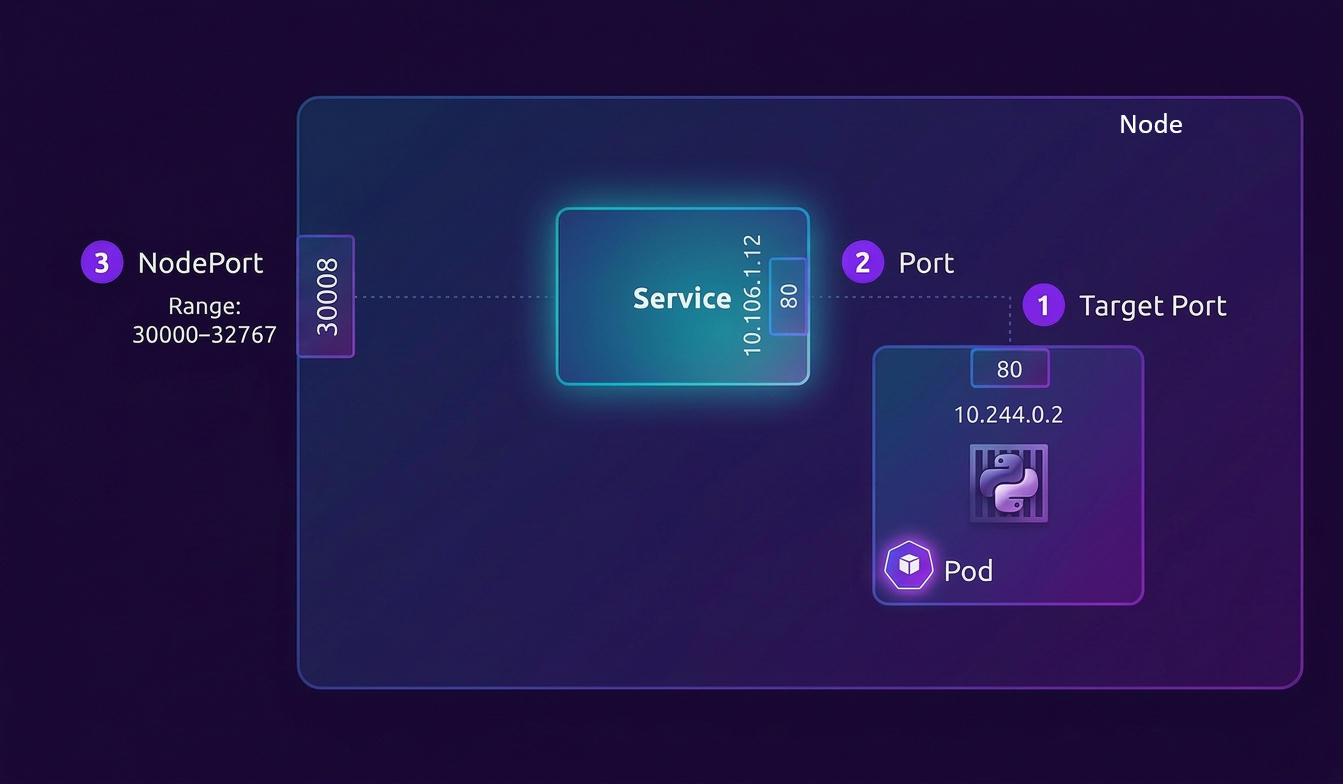
NodePort services involve three distinct port layers. Understanding the flow requires precise terminology:
|
|
TargetPort: The port on the pod’s container where the application listens. This is the actual application port—80 for HTTP, 443 for HTTPS, 8080 for application servers, 3306 for MySQL. The service forwards traffic to this port.
Port: The port on the service’s ClusterIP. Services act as virtual servers with their own IP addresses. Traffic destined for <ClusterIP>:<Port> is intercepted and forwarded. This port can match the targetPort or differ—useful when exposing non-standard application ports on standard service ports.
NodePort: The port opened on every node’s network interface. Range: 30000-32767. External traffic hitting <NodeIP>:<NodePort> gets forwarded to the service.
Port mapping example: An application running on port 8080 (targetPort) can be exposed on service port 80 (port) and accessed via node port 30080 (nodePort).
Service Definition: Declarative Configuration
Service objects are defined in YAML manifests following the standard Kubernetes resource structure:
|
|
apiVersion: Services belong to the core API group (v1), unlike Deployments and ReplicaSets which belong to apps/v1.
kind: Service—distinguishes this from other resource types.
metadata: Standard object metadata. The name must be a DNS-compatible label (lowercase, alphanumeric, hyphens). Namespace determines isolation boundaries.
spec.type: Defaults to ClusterIP if omitted. Valid values: ClusterIP, NodePort, LoadBalancer, ExternalName.
spec.selector: Label selector identifying target pods. Services continuously watch for pods matching this selector. When pods are created, deleted, or modified, the service updates its endpoints automatically. The selector is a map of key-value pairs; all specified labels must match (AND logic).
spec.ports: Array of port configurations. Multiple port mappings are supported for applications exposing multiple ports (HTTP and HTTPS, for instance).
Port field hierarchy:
port: Required. The service port.targetPort: Optional, defaults toport. Accepts numeric ports or named container ports.nodePort: Optional for NodePort type. If omitted, Kubernetes allocates from the available range.protocol: Defaults to TCP. Supports TCP, UDP, and SCTP.name: Required when multiple ports are defined. Must be unique within the service.
Label Selectors: Service-Pod Binding Mechanism
The selector mechanism establishes the relationship between services and pods. This is fundamental to Kubernetes service discovery.
When a service is created, the controller queries the API server for pods matching the selector. Each matching pod’s IP address and targetPort form an endpoint. The service’s Endpoints object stores this mapping.
Endpoints are the IP addresses of the pods. They are the actual destinations that receive traffic from the Service’s virtual IP address.
Example flow:
- Pod created with labels
app: frontend, version: v1 - Service created with selector
app: frontend - Service controller finds matching pods, creates Endpoints object with pod IPs
- kube-proxy on each node watches Endpoints, programs iptables/IPVS rules
- Traffic to the service’s ClusterIP gets load-balanced across endpoint IPs
The kubectl describe service <service-name> command reveals the selector and endpoints. The kubectl get endpoints <service-name> command shows the current pod IPs.
If no pods match the selector, the service has no endpoints. Traffic to such a service receives no response.
Multi-Pod Load Balancing
Services provide built-in load balancing across backend pods. When multiple pods match a service’s selector, traffic distributes across all endpoints.
Load balancing algorithm:
kube-proxy modes determine distribution behavior:
-
iptables mode (default): Random selection. Each connection randomly picks a backend. Established connections persist to the same backend. No round-robin—pure random distribution weighted by endpoint count.
-
IPVS mode: Supports multiple algorithms: round-robin (rr), least connections (lc), destination hashing (dh), source hashing (sh), and others. IPVS provides superior performance for large-scale services (thousands of endpoints).
-
userspace mode (deprecated): Round-robin distribution with userspace proxy overhead.
Session affinity:
For applications requiring sticky sessions, spec.sessionAffinity set to ClientIP ensures all requests from a single client IP route to the same backend pod. The timeout (spec.sessionAffinityConfig.clientIP.timeoutSeconds) defaults to 10800 seconds (3 hours).
|
|
Headless services:
Setting spec.clusterIP to None creates a headless service. No ClusterIP is assigned. DNS queries return A records for each backend pod IP, enabling client-side load balancing or custom discovery logic.
Multi-Node Deployment: Automatic Spanning
Services abstract over nodes. When pods are distributed across multiple nodes, the service automatically spans all nodes without configuration changes.
NodePort behavior across multiple nodes:
- A NodePort service opens the same port number on every node in the cluster.
- Traffic arriving at
<Node1IP>:<NodePort>,<Node2IP>:<NodePort>, or<Node3IP>:<NodePort>all route to the same service. - The service’s endpoints include all matching pods regardless of node location.
- Traffic may route to pods on different nodes than the receiving node.
Cross-node routing:
When traffic arrives at a node with no local backend pods, kube-proxy forwards traffic across the network to pods on other nodes. This adds network hops but maintains availability.
External traffic policy:
For latency-sensitive applications, spec.externalTrafficPolicy: Local prevents cross-node forwarding. Traffic arriving at a node routes only to pods local to that node. If no local pods exist, the connection drops. This preserves client source IPs (otherwise NAT-ed to node IP) and reduces network hops.
|
|
Trade-off: Local policy reduces cross-node traffic but creates uneven load distribution if pod counts vary across nodes.
Service Lifecycle and Updates
Services are dynamic. As pods are created, destroyed, or moved between nodes, services adapt.
Pod addition: When new pods matching the selector start, the endpoints controller adds them to the service’s endpoints within seconds.
Pod removal: When pods terminate, endpoints are removed before the pod fully stops. This uses readiness probes—pods only receive traffic when their readiness probe succeeds.
Pod failure: If a pod crashes or becomes unresponsive, the endpoints controller removes it based on readiness probe failures or API server state changes.
Manual endpoint management: For services without selectors (spec.selector omitted), the endpoints object is not created automatically. You must create an Endpoints object manually, enabling service abstraction over external IPs or non-standard resources.
|
|
DNS Integration
Kubernetes DNS (CoreDNS) automatically creates DNS records for services.
Service DNS names:
<service-name>(within the same namespace)<service-name>.<namespace>(within the cluster)<service-name>.<namespace>.svc.cluster.local(full FQDN)
DNS resolution returns the ClusterIP for normal services or pod IPs for headless services.
Applications use DNS names instead of hardcoding IP addresses:
|
|
Practical Deployment Example
Creating a complete NodePort service:
Pod definition (web-pod.yaml):
|
|
Service definition (web-service.yaml):
|
|
Deployment commands:
|
|
Access verification:
|
|
Verification across multiple nodes:
|
|
All nodes expose port 30080, routing to backend pods regardless of location.
Summary
Kubernetes services provide stable networking abstractions over dynamic pod sets. The three service types—ClusterIP, NodePort, and LoadBalancer—address different networking requirements. Label selectors bind services to pods, enabling automatic endpoint management. Services load-balance traffic across matching pods, adapt to pod lifecycle changes, and span multiple nodes without additional configuration. This abstraction enables loose coupling between microservices while providing consistent network interfaces for internal and external communication.
Your inbox needs more DevOps articles.
Subscribe to get our latest content by email.