
Kubernetes Architecture
Website Visitors: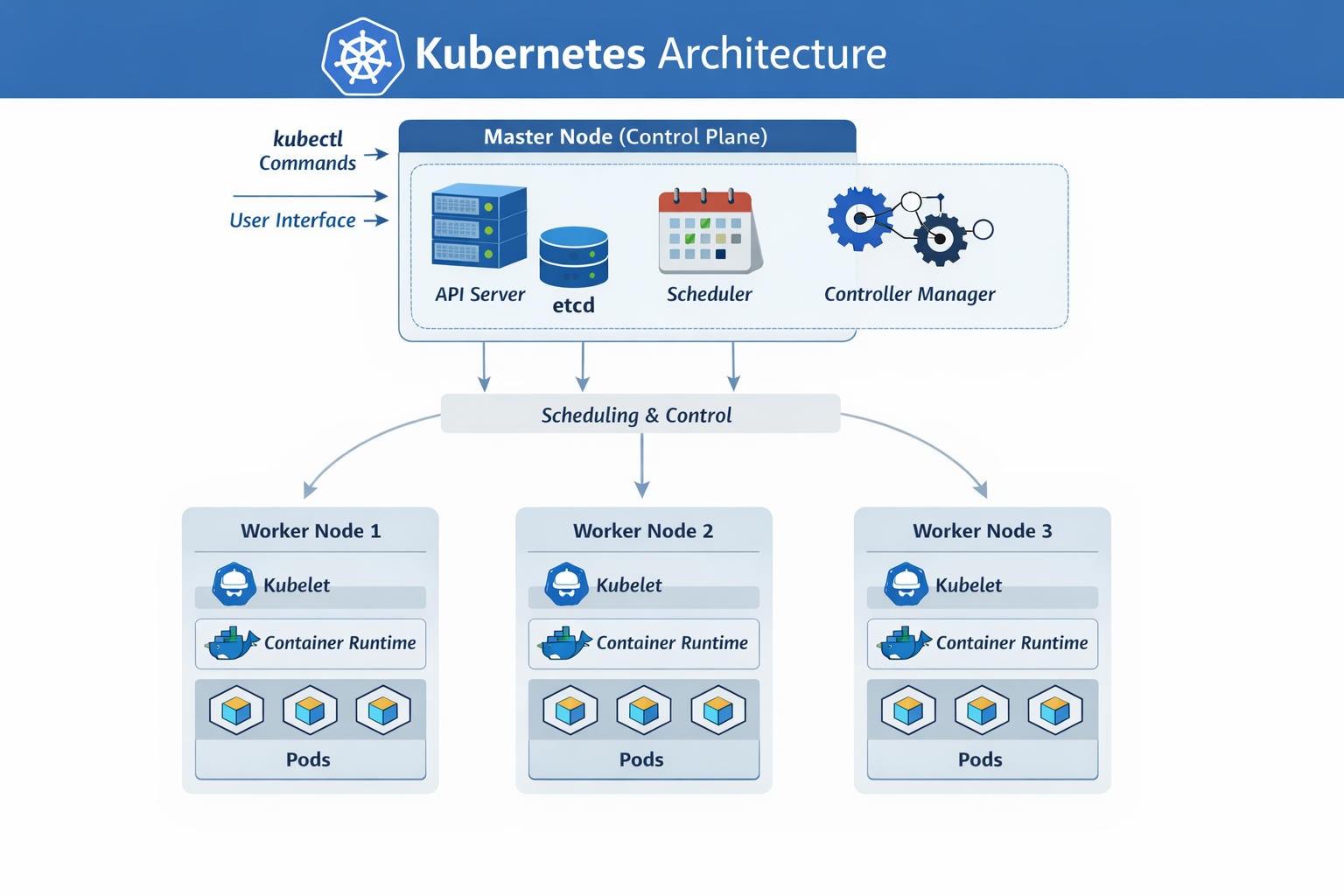
Definitions
A node is a machine—either physical or virtual—where Kubernetes is installed. It acts as a worker machine, which means this is where Kubernetes actually runs your containers. In older versions, nodes were called minions, so you may still hear that term used.
Now, imagine the node running your application suddenly fails. Your application would go down with it. That’s why in real-world environments, you don’t rely on a single node. Instead, you use multiple nodes grouped together into what’s called a cluster. A cluster is simply a collection of nodes working together. If one node fails, the application can continue running on another. Having multiple nodes also helps distribute traffic and balance the workload.
So we have a cluster—but who manages it? Where is all the cluster information stored? How are nodes monitored? And if a node fails, who decides to move the workload elsewhere?
That’s where the master node comes in. The master is another machine with Kubernetes installed, but it’s configured specifically to manage the cluster. It monitors the worker nodes and handles the orchestration of containers across them.
When you install Kubernetes, several components are set up:
-
API Server – This acts as the front end of Kubernetes. All user interactions—whether through command-line tools or other interfaces—go through the API server to communicate with the cluster.
-
etcd – A distributed and reliable key-value store used to save all cluster data. It keeps track of nodes, configurations, and the overall state of the cluster. In setups with multiple masters and multiple nodes, etcd stores information about all these, in a distributed way and helps prevent conflicts through internal locking mechanisms, so that there is no conflict between masters.
-
Scheduler – Responsible for assigning newly created containers (pods) to available worker nodes based on resource availability and other factors.
-
Controllers – These monitor the cluster’s state. If a node or container fails, controllers detect the issue and take corrective action, such as starting replacement containers.
-
Container Runtime – The software used to run containers. In many setups, this is Docker, though other runtimes like containerd or CRI-O can also be used.
-
Kubelet – An agent that runs on every worker node. It communicates with the master and ensures that containers are running as expected.
Few other definitions:
-
Pod - In Kubernetes (K8s), a Pod is the smallest deployable unit that can contain one or more tightly coupled containers, sharing the same network IP, storage, and configuration. It’s essentially a wrapper for containers that need to run together on the same node. Think of it as a “logical host” for one or more containers. A Pod is like a house, and the containers inside it are the people living in the house. They share the same address (IP), utilities (storage), and can easily communicate with each other, but each person (container) can still do their own job.
-
Service - In Kubernetes, a Service is a method for exposing a network application that is running as one or more Pods in your cluster. A key aim of Services in Kubernetes is that you don’t need to modify your existing application to use an unfamiliar service discovery mechanism. You can run code in Pods, whether this is a code designed for a cloud-native world, or an older app you’ve containerized. You use a Service to make that set of Pods available on the network so that clients can interact with it.
-
Deployment - In Kubernetes, a Deployment is a resource used to manage and run a set of identical pods. It ensures that a specified number of pod replicas are always running in the cluster. Deployments also handle scaling, updates, and rollback of applications automatically. Kubernetes maintains the desired state defined in the Deployment configuration. Deployment is where you specify the desired number of pod replicas that should always be running. Kubernetes continuously ensures that this number is maintained. For example, if you set
replicas: 3, Kubernetes will keep 3 pods running at all times, and if one pod fails, it automatically creates a new one.
Master Nodes And Worker Nodes
There are two main types of machines in a Kubernetes environment: master nodes and worker nodes.
The master server runs the Kubernetes API server, which is what makes it the “master” in the first place. Master nodes, run the API server, the scheduler, the controller manager, and maintain the etcd key-value store. These components together make the machine a master and give it control over the cluster.
The master node, also called the control plane, manages the entire cluster. It hosts key components like the kube-apiserver (front-end for cluster operations), etcd (key-value store for cluster state), kube-scheduler (assigns pods to nodes), and kube-controller-manager (runs controllers for resources like replicasets). These ensure global decisions on scheduling, scaling, and state maintenance.
Meanwhile, worker nodes have the kubelet agent, which chats with the master—sending health updates about the node and carrying out any tasks the master assigns. All that info gets stored in a key-value store right on the master. Worker nodes host the containers. For this to work, they need a container runtime installed (such as Docker). They also run the kubelet agent, which communicates with the master, reports health status, and executes instructions.
Worker nodes execute the actual workloads by hosting pods (groups of containers). Each runs kubelet (agent communicating with the API server to manage pod lifecycle and report status), kube-proxy (handles networking and load balancing for services), and a container runtime like containerd or CRI-O.
Understanding how these components are distributed between master and worker nodes is important when setting up and configuring a Kubernetes environment.
Finally, there’s the command-line tool used to interact with Kubernetes: kubectl (often pronounced “kube control”). This tool allows you to deploy and manage applications, inspect cluster information, and control various resources.
Some basic commands to know:
kubectl run– Deploy an application to the clusterkubectl cluster-info– View information about the clusterkubectl get nodes– List all nodes in the cluster
Pods and Nodes in Kubernetes: How Containers Are Distributed
When working with Kubernetes, two common questions arise about how workloads are organized and distributed across machines:
- Can a Kubernetes cluster span multiple machines or nodes?
- If a pod contains multiple containers, can those containers run on different nodes?
Understanding these concepts helps clarify how Kubernetes schedules and manages workloads.
Kubernetes Clusters and Multiple Nodes
A Kubernetes cluster is designed to run across multiple nodes, which can be physical machines or virtual machines. Each node contributes computing resources such as CPU, memory, and storage to the cluster.
Clusters typically contain two types of nodes:
- Control plane nodes – responsible for managing the cluster, maintaining its state, and scheduling workloads.
- Worker nodes – responsible for running application workloads.
Applications are packaged into pods, and Kubernetes distributes these pods across available worker nodes based on resource availability and scheduling rules.
For example, in a cluster with three worker nodes, Kubernetes may distribute application pods like this:
|
|
If one node becomes unavailable, Kubernetes can reschedule pods onto other nodes to maintain application availability. This ability to spread workloads across multiple machines is a key reason Kubernetes is widely used for scalable and resilient systems.
Pods and Their Containers
A pod in Kubernetes can contain one or more containers. Containers inside the same pod are intended to work closely together and share certain resources.
However, an important constraint exists: All containers in a pod always run on the same node.
Kubernetes schedules pods as a single unit, not individual containers. Because of this, the containers within a pod cannot be split across different nodes.
A valid deployment looks like this:
|
|
But Kubernetes will never distribute containers of the same pod across nodes like this:
|
|
Why Containers in a Pod Stay on the Same Node
Containers in a pod share several runtime resources, including:
- A single IP address and network namespace
- Shared storage volumes
- The ability to communicate through localhost
- A shared lifecycle managed by Kubernetes
Because these resources depend on operating system–level namespaces, the containers must run on the same machine.
Conceptual View
You can think of Kubernetes scheduling in two layers:
- Cluster level: Kubernetes distributes pods across nodes.
- Pod level: Each pod contains one or more tightly coupled containers running on the same node.
This design allows Kubernetes to scale applications across many machines while still enabling closely cooperating containers to run together.
In summary, Kubernetes clusters can span many nodes, allowing workloads to scale across multiple machines. However, while a pod may contain multiple containers, those containers always run together on a single node because they share networking, storage, and lifecycle resources.
Container VS Pods
Container
A container is:
- A lightweight runtime instance of an image
- Runs a single application process
- Created by a container runtime (Docker / containerd)
- The smallest runnable unit
Example:
- A Node.js app
- A Python API
- A MySQL database
Without Kubernetes, you just run containers directly.
Pod (Kubernetes Concept)
A Pod is:
- The smallest deployable unit in Kubernetes.
- A wrapper around one or more containers.
It provides:
- Shared network (same IP address)
- Shared storage (volumes)
- Shared lifecycle
- Shared namespace
Kubernetes does NOT deploy containers directly. It always deploys them inside a Pod.
Why Multiple Containers in One Pod?
Sometimes you want tightly coupled containers.
Example:
- App container
- Logging sidecar container
- Proxy container
They:
- Share the same IP
- Can talk via localhost
- Share volumes
This pattern is called the sidecar pattern.
Deploying Containers in Pods
-
Pods and Containers:
- A Pod can contain one or more containers, but most often it contains just one.
- So the relationship is usually one Pod → one container, but not always.
-
Multiple containers in a Pod:
- Multiple containers are used when they must work very closely together, sharing the same network namespace and storage.
- This is called a “sidecar pattern”, e.g., a logging container running alongside an application container.
-
Deploying a single container in a Pod:
- Yes, you can deploy a Pod with just one container, and this is the most common scenario in Kubernetes.
Summary:
- One container per Pod is normal.
- Multiple containers per Pod are allowed but only when they need tight coupling.
Your inbox needs more DevOps articles.
Subscribe to get our latest content by email.