
Why Containers Exist: Docker and the End of Dependency Problems
How Docker Solves Dependency Conflicts and Deployment Inconsistency
Website Visitors:Containers And Docker
Introduction
Software rarely fails because the code is wrong. It fails because the environment is wrong. An application works on a developer’s laptop, breaks on the test server, and collapses in production. Different operating systems, mismatched library versions, missing dependencies, and subtle configuration drift create friction that slows teams down and introduces risk. This problem has existed for decades, and traditional solutions—manual setup, documentation, and virtual machines—have only partially addressed it.
Containers emerged as a response to this exact pain. They change how software is packaged, deployed, and run by redefining the boundary between an application and the system it runs on. Docker popularized this model by making containers accessible, repeatable, and portable across environments. Together, containers and Docker reshape dependency management, deployment speed, and operational consistency.
This article explains why containers are needed, how Docker works, how containers remove dependency problems, the operating system constraints behind them, and how containers differ from virtual machines. By the end, the logic behind modern containerized infrastructure becomes unavoidable.
Why Containers Exist
Containers exist to solve the environment problem. Applications depend on specific runtimes, libraries, binaries, and configurations. When these dependencies are installed directly on a host system, they collide with other applications and change over time. The result is fragile deployments and unpredictable behavior.
Containers isolate applications at the process level while sharing the host kernel. Each container packages only what the application needs to run, nothing more. This creates environment consistency: the same application behaves identically in development, testing, and production.
They are also efficient. Because containers do not include a full operating system, they start quickly and consume fewer resources than traditional approaches. This efficiency enables rapid scaling and makes containers disposable by design. If a container fails, it is replaced, not repaired.
Without containers, teams rely on manual configuration and implicit assumptions about the host. Containers replace those assumptions with explicit, portable definitions.
Real-world example: payment service deployment
A fintech company runs a payment processing service built with Node.js. In development, engineers use Node.js 18. The staging server has Node.js 16 installed for legacy reasons. Production runs Node.js 14 because another application depends on it. The payment service works locally, fails intermittently in staging due to missing crypto libraries, and crashes in production because of incompatible language features. Fixes involve manual upgrades, rollbacks, and coordination across teams, repeatedly breaking unrelated services.
With containers, the payment service is packaged once with Node.js 18 and all required libraries inside a container image. The same image runs unchanged in development, staging, and production. The host systems remain untouched. Other applications continue using their own runtimes without conflict. Deployment failures caused by environment differences disappear.
This is why containers exist: to prevent environment mismatch from becoming a production risk.
Docker and Dependency Elimination
Docker is the platform that standardized container usage. It introduced a simple model built around images and containers, backed by a runtime that works the same everywhere.
A Docker image is an immutable blueprint. It contains the application, its runtime, required system libraries, and configuration. Images are built once and versioned. They do not change after creation.
A Docker container is a running instance of that image. When an image is executed, Docker adds a thin writable layer and starts the application process. When the container stops, the image remains untouched.
This model removes dependency problems by encapsulation. Dependencies are no longer installed on the host. The host provides only the kernel. Multiple applications with conflicting requirements can run side by side because each container carries its own dependency set.
Consider two services: one requires Python 3.8, the other Python 3.12. On a traditional server, this creates conflict. With Docker, each service runs in its own container with its required version. No collision occurs, and no coordination is needed.
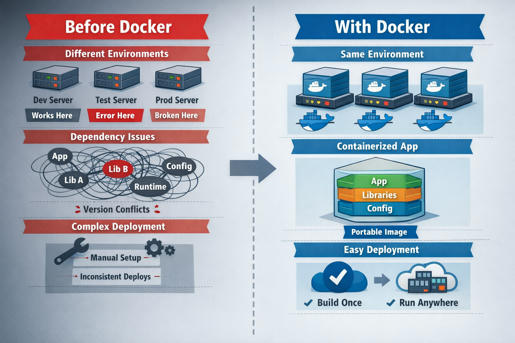
Docker does not eliminate dependencies. It eliminates dependency uncertainty by freezing them into immutable artifacts.
Operating System Constraints Explained
Containers are not virtual machines. They rely directly on the host operating system kernel. This creates an important constraint.
A Linux host can run only Linux containers because Linux containers require Linux kernel features. A Windows container requires the Windows kernel and therefore must run on a Windows host. Windows systems can still run Linux containers, but not natively. Docker solves this by running a lightweight Linux virtual machine in the background. Linux containers run inside that VM, not directly on the Windows kernel. The abstraction is hidden, but the limitation remains fundamental.
This explains why container images are OS-specific and why “build once, run anywhere” still assumes a compatible kernel underneath.
Containers vs Virtual Machines
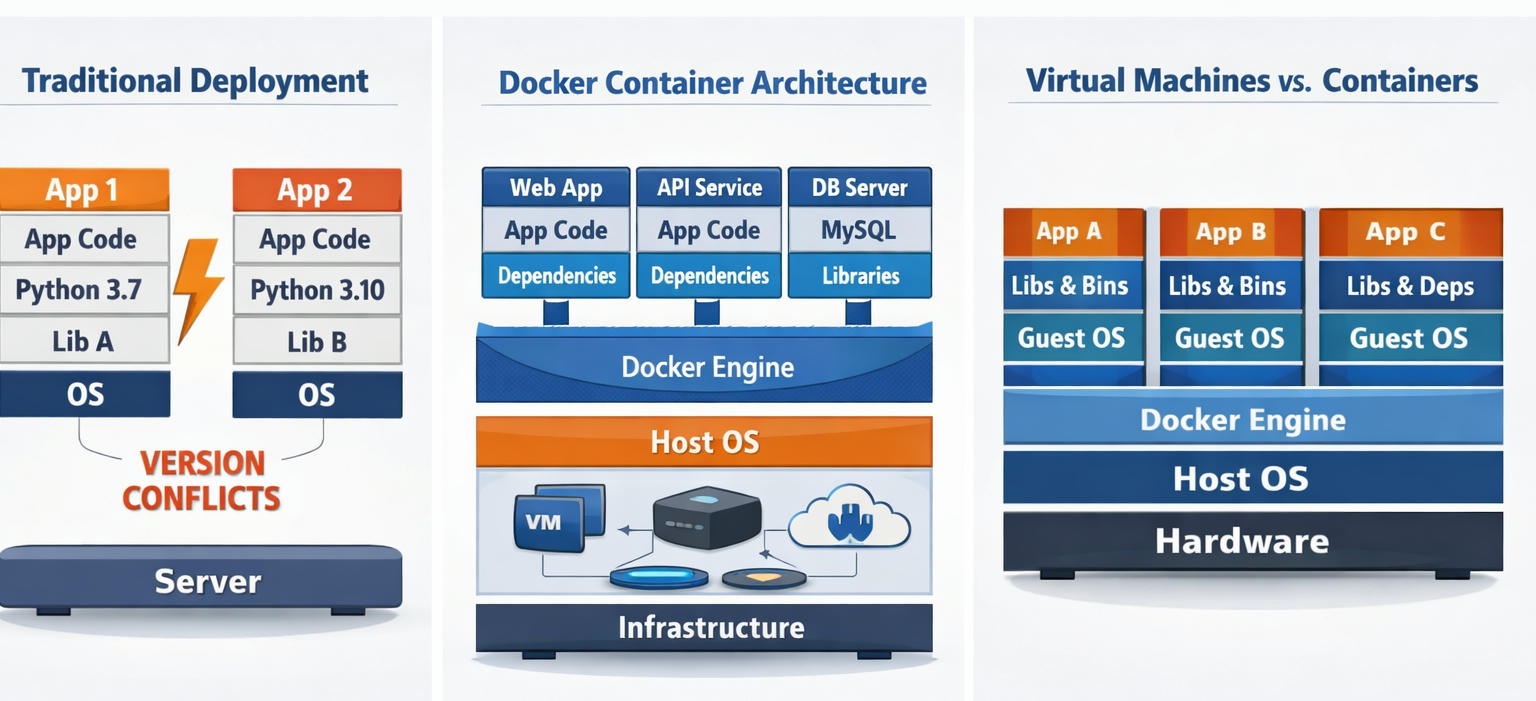
Virtual machines virtualize hardware. Containers virtualize the operating system.
A virtual machine includes a full guest operating system with its own kernel. This provides strong isolation but comes with high overhead. VMs are slower to start, consume more resources, and scale less efficiently.
Containers share the host kernel and isolate processes instead of hardware. They package only the application and its dependencies, making them lightweight and fast. Dozens of containers can run where only a few virtual machines fit.
Virtual machines are still useful when full OS isolation is required or when running entirely different operating systems on the same host. Containers are superior for application deployment, scaling, and consistency.
The difference is not incremental. It is architectural.
Conclusion
Containers exist because traditional deployment models fail under scale, speed, and complexity. They isolate applications, stabilize environments, and eliminate dependency conflicts by design. Docker made this model practical by standardizing how containers are built and run, turning environments into portable artifacts instead of fragile setups.
Understanding the kernel-level constraints explains why containers behave the way they do and why operating system compatibility matters. Comparing containers to virtual machines clarifies why modern systems favor containers for application delivery and reserve VMs for infrastructure boundaries.
The core takeaway is simple: containers shift responsibility from runtime guesswork to build-time certainty. That shift enables faster deployment, safer scaling, and predictable systems. As software systems grow more distributed, this model is not optional. It is foundational.
Your inbox needs more DevOps articles.
Subscribe to get our latest content by email.